
Chat with Us
0161 376 5644
0161 376 5644
0161 376 5644
0161 376 5644

Choosing the right paper for your POS system is about more than just finding a roll that fits; it’s about print longevity, printer health, and customer safety. In 2026, technical specifications like GSM, core diameter, and chemical composition (BPA-free) are essential for any professional UK operation.
Receipt paper generally falls into two categories: Thermal and Non-Thermal (Impact).
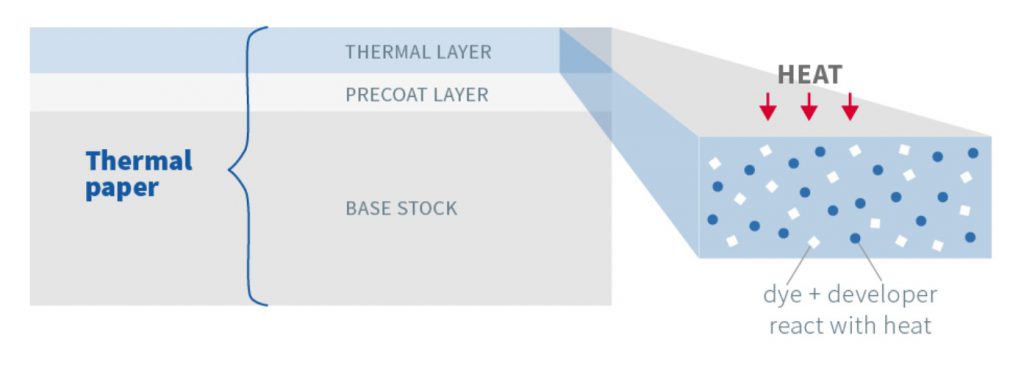
Most modern POS printers use Direct Thermal technology. This paper is coated with a heat-sensitive chemical layer that turns black when it passes under the printer’s thermal head.
No Ink Required: You never need to replace ribbons or cartridges, making it cost-effective.
Sensitivity: Thermal paper is sensitive to light and heat; overexposure can cause receipts to fade or the entire roll to darken.
When buying till rolls, you will see a format like 80mm x 80mm x 12.7mm.
Width (e.g., 80mm or 57mm): The most critical measurement.
80mm: Standard for fixed desktop receipt printers.
Choose Your Receipt Printer Here.
57mm: Standard for credit card terminals and mobile POS devices.
Diameter (e.g., 80mm, 40mm): The total width of the roll from edge to edge. If this is too large, the roll won't fit in your printer's compartment.
Core Size (e.g., 12.7mm): The diameter of the central tube. Most UK terminals use a standard 12.7mm core.
Coreless Rolls: Modern eco-friendly options have no central tube, providing more paper per roll and less waste.
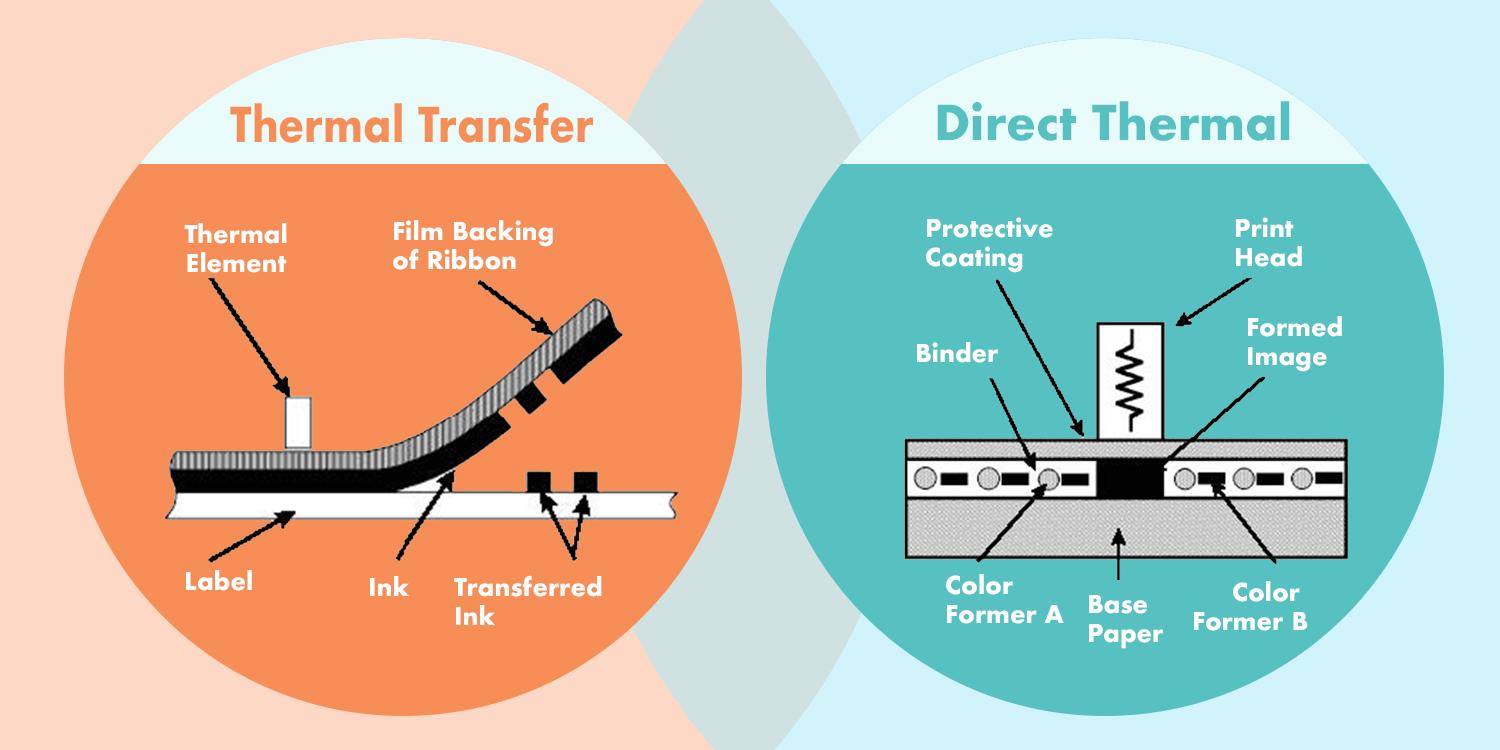
Label selection depends on how long you need the label to last and the environment it will be in.
Ideal for short-term use, such as shipping labels, event tickets, or "use-by" dates on fresh food.
Pros: Simplest to use; no ribbons required.
Cons: Susceptible to UV light, heat, and moisture, which can cause fading over time.
Designed for long-term or harsh environments, such as asset tracking, outdoor signage, or warehouse inventory.
How it works: A thermal print-head melts a wax or resin ribbon onto the label surface.
Pros: Highly durable; resistant to chemicals, extreme temperatures, and abrasion.
Cons: Requires the extra cost and setup of a ribbon.
To ensure you're getting high-quality supplies, look for these terms in the product description:
| Term | What it Means | Why it Matters |
| BPA-Free | Bisphenol A (BPA) is a chemical often used in thermal coatings. | BPA-Free is essential for the health of your staff and customers. |
| GSM (Paper Weight)* | "Grams per Square Metre" measures the thickness/density of the paper. | Higher GSM (e.g., 55g–80g) feels more premium and is less likely to tear or jam. Be aware that thicker paper might not necessarily indicate good quality! |
| FSC Certified | Forest Stewardship Council certification ensures paper comes from responsibly managed forests. | Vital for meeting UK ESG (Environmental, Social, and Governance) goals. |
| Linerless | Labels that don't have a backing sheet (the "wasted" paper you peel off). | Greatly reduces waste and allows for more labels per roll. |
| Top-Coated | An extra protective layer applied to thermal paper. | Protects against oils, humidity, and alcohol, ensuring receipts stay readable longer. |
*Is thicker paper always better quality? Many cheaper rolls use lower-quality, thicker base paper. While the roll looks the same size (e.g. an 80mm outer diameter), the thickness means you are getting significantly less length. A "budget" 80m roll can actually be as short as 60m, meaning you are changing rolls more often and paying more per metre than you realise.
Standard (55gsm): ~75m–80m
Cheap/Thick (Higher bulk/Lower density): ~60m–65m
Printer Head Health: With low grade paper, there are usually high levels of paper dust and loose pulp. This dust acts like sandpaper on the thermal print head, significantly shortening its lifespan. Replacing a print head is far more expensive than the "savings" from cheap paper.
Poor Thermal Coating: Cheap rolls often use a thin, unstable coating that is sensitive to light and heat. While a premium roll ensures a 5-year legibility life span, budget receipts can fade to blank white in just months - a major issue for customers needing receipts for tax, warranties or other important documentation. Look for "Low Dust" or "Premium Coated" options to protect your hardware investment and ensure your receipts remain readable for years, not weeks.
The weight of a till roll depends on its width and paper thickness (GSM). For example, a box of 12 thermal rolls measuring 112mm x 90mm (approximately 90m in length) typically weighs around 5 kg. Standard 58gsm paper is common for achieving these lengths.
80mm (3 1/8"): The industry standard for fixed desktop receipt printers, such as those from Star or Epson.
57mm (2 1/4"): The most common width for mobile POS terminals, handheld credit card readers, and portable printers.
Tip: Always check your printer's maximum diameter; if a roll is too large (e.g., 80mm diameter), it will not fit in the compartment.
Yes, all thermal paper produced or sold in the UK and EU must be BPA-free. Legislation introduced in 2020 prohibits any thermal paper with a BPA concentration of 0.02% or higher due to health concerns. Most manufacturers now use Bisphenol S (BPS) as a safer alternative.
At a minimum, most UK retail startups require:
A Core Processing Device (e.g., a tablet, smartphone, or dedicated POS terminal).
A Card Reader for accepting contactless and chip-and-pin payments.
A Cash Drawer for secure physical currency management..
Check your printer manual for the maximum supported roll width and diameter.
Determine longevity: Use Direct Thermal for receipts/temporary labels; use Thermal Transfer for permanent inventory.
Prioritise health & planet: Always select BPA-Free and FSC-Certified stock to future-proof your business against 2026 regulations.
Ready to Choose? Shop:
{"one"=>"Select 2 or 3 items to compare", "other"=>"{{ count }} of 3 items selected"}
Leave a comment