
Chat with Us
0161 376 5644
0161 376 5644
0161 376 5644
0161 376 5644

Before you purchase an ID card printer, an important part to think about in this process is what you'd like included in your card design e.g. lamination, or other design requirements.
In this guide, we'll explain what each card printing process looks like and how that will affect the outcome of your intended design.
You can customise a card with simple printing like a name and photo, or move onto more complex designs that make it stand out, depending on what you require.
Visual & Graphic Customisation
Change the way a card looks and feels by using specialty ribbons. Here's how:
Full-Color Printing (YMCKO): Uses standard dye-sublimation (scroll down to learn more!) to render high-definition photos, logos, and backgrounds.
Monochrome Thermal Transfer: If you don't need colour, you can use single-colour ribbons. Beyond standard black, manufacturers offer metallic gold, metallic silver, red, blue, green, and bright white.
Signature Panels: Using a Write-on Ribbon (like the Evolis RCT021NAA), the printer can apply a matte, rough rectangular patch directly onto a glossy PVC card, allowing cardholders to sign it with a standard ballpoint pen.
Scratch-Off Panels: Used for gift cards or pin numbers. The printer applies a silver, scratchable overlay panel over a printed code.
Security Protection
If you are intending on using a card printer for government IDs or corporate access badges, there are physical features you can apply too:
Ultraviolet (UV) Fluorescent Printing: By using a ribbon with an extra "F" (Fluorescent) panel (like a YMCFK ribbon), the printer can print a ghost image, text, or logo that is completely invisible under normal light but glows brightly under a blacklight.
Holographic Overlays: During lamination, the printer applies a clear protective film with pre-embedded holographic designs (like globe patterns, micro-text, or custom company watermarks) that shift colour when tilted.
Tactile Impressions (Embossing): Some high-end enterprise printers feature physical dies that stamp a physical, raised pattern or logo directly into the card plastic during the lamination process, making the card instantly identifiable by touch.
You can also write digital data with certain card printers onto a card for things like magnetic stripe, contact smart chip and contactless smart cards.
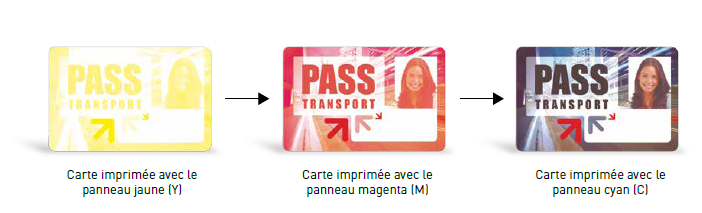
This is the most common and budget-friendly technology used in standard desktop printers.
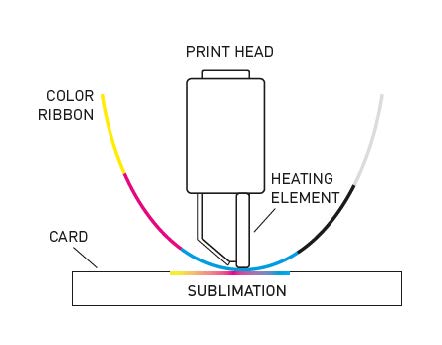
Evolis Examples: Badgy200, Zenius 2, Primacy 2, and the high-volume Quantum 2.
How it works: The printer uses a thermal printhead and an ink ribbon made of consecutive color panels—typically Yellow, Magenta, Cyan, Black (K), and a protective Overlay (O), commonly called a YMCKO ribbon. As the plastic card passes directly under the printhead, the thousands of tiny heating elements on the printhead vaporise (sublimate) the ink dye directly into the pores of the PVC plastic.
Because the printhead makes direct contact with the card, it cannot print completely over the outer edge without risking a broken printhead. This leaves a white border around the perimeter of the card. Furthermore, if the card has an embedded chip (like an access control card), the slight bump can cause the printhead to skip, resulting in a faint patch or artifact around the chip.

This is a premium, industrial-grade technology used for high-definition, heavy-duty, or highly secure cards.
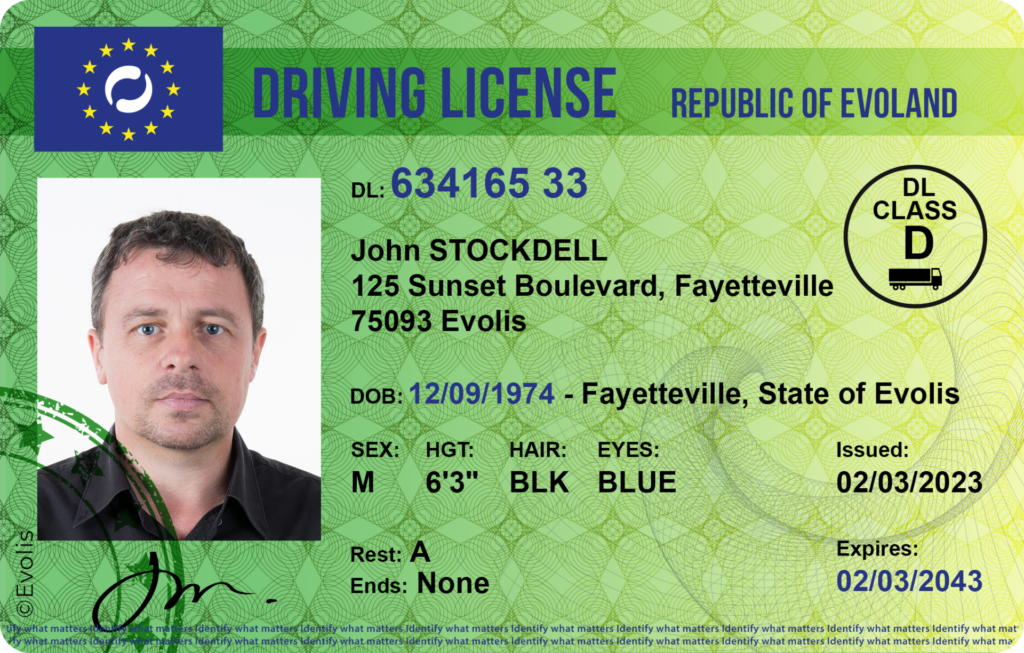
Evolis Examples: Agilia, Avansia.
How it works: This is a two-step process. Instead of printing directly onto the hard plastic card, the thermal printhead prints your design in reverse onto the underside of a clear, flexible film. Once the image is on the film, a heated roller bonds and fuses that entire film layer directly onto the surface of the plastic card using heat and pressure.
Since the printhead never touches the card itself, it cannot be damaged by uneven surfaces. This allows you to print flawless, edge-to-edge (over-the-edge) graphics with zero white borders. It is the absolute gold standard for printing on smart cards, RFID cards, or non-PVC materials like Polycarbonate.
This is an eco-friendly option designed for cards that are meant to be temporary and frequently updated.
Evolis Examples: Tattoo RW.
How it works: This technology uses no ribbon at all. Instead, it uses special rewritable cards that feature a thermo-chromic material layer embedded inside the plastic. The printer's thermal printhead applies heat at a very specific temperature to activate the dye layer and "write" monochrome text or graphics onto the card. When the card needs updating, the printer heats the card to a slightly different temperature, erasing the existing image, and instantly reapplying the new data. A single card can usually be erased and rewritten up to 500 times.
It is incredibly cost-effective for visitor badges, temporary event passes, or loyalty point tallies because you never have to buy ink ribbons.
A: The main difference is whether the ink is printed directly onto the card or onto a clear film first.
Direct-to-Card (e.g., Evolis Primacy 2): The printhead applies heat to transfer ink directly from the ribbon onto the PVC card. This is faster and more cost-effective but leaves a tiny, unprinted white border around the edge.
Retransfer (e.g., Evolis Agilia): The printhead prints the image onto a flexible clear transfer film, which is then heat-bonded over the entire card. This delivers true "over-the-edge" coverage (no white borders) and handles smart cards with embedded chips without causing print artifacts.
A: While you can do it, it is not recommended for high-volume jobs. Because the Primacy 2 is a Direct-to-Card printer, the thermal printhead must physically touch the surface of the card. Contactless cards have an embedded chip and antenna inside, which creates a very slight, uneven bump on the surface. This bump can cause the printhead to skip, leaving a faint "shadow" or unprinted spot around the chip.
For access badge printing, a retransfer printer like the Evolis Agilia is the ideal solution because the film layer bridges any physical surface unevenness perfectly.
A: A standard printed PVC card will typically last 1 to 2 years before daily friction, handling, and UV exposure start to fade or scratch the image.
If you add a lamination module (like the Evolis Card Lamination Module / CLM), the printer applies a thick protective varnish or polyester patch over the card. This extends the card's physical lifespan up to 5 to 10 years, making it highly resistant to abrasion, chemicals, and tampering.
A: Both are used for color printing, but they are built for different printer configurations:
YMCKO: Best for single-sided printing. It contains Yellow, Magenta, Cyan, Black, and a protective Overlay panel to seal the front of your card.
YMCKOK: Specifically designed for double-sided printers. It has all the panels of a YMCKO ribbon to print a full-color front, plus an extra K (Black) panel to print monochrome text, terms and conditions, or a barcode on the back—preventing you from wasting expensive colour ink on a simple back-side design.
A: Print ribbons usually snap if the printhead temperature is set too high in your printing preferences, or if the printhead tries to print over a card surface contaminated by fingerprints, oil, or dust.
Quick Fix: Do not throw the broken ribbon away! Simply pull both ends out of the machine, tape them back together cleanly with regular sticky tape, wind the tape past the splice onto the take-up spool, and reload the cassette. The printer will automatically calibrate and resume printing.
Here is a checklist before you choose your card printer:
{"one"=>"Select 2 or 3 items to compare", "other"=>"{{ count }} of 3 items selected"}
Leave a comment